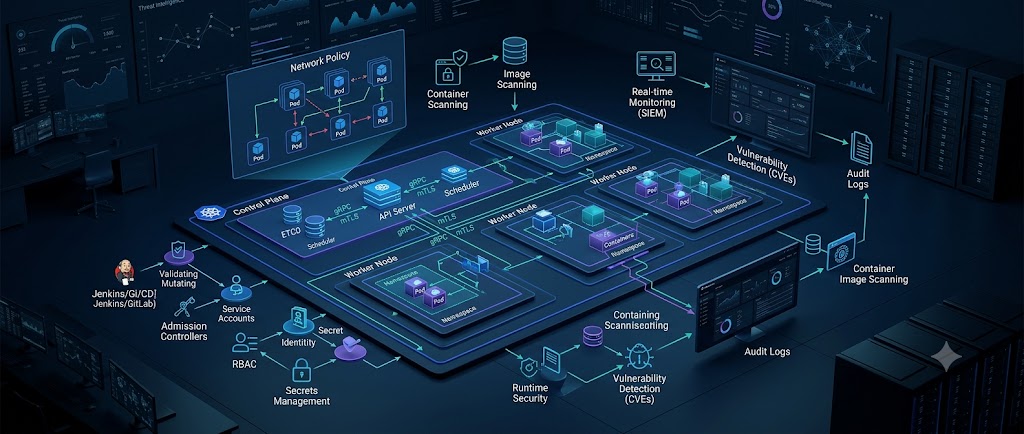
Google Cloud Platform (GCP) is widely used to host web applications, APIs, databases, containers, machine learning workloads, data platforms, and enterprise infrastructure. As cloud environments become more distributed, securing identities, workloads, networks, and sensitive data has become a core security requirement.
A strong Google Cloud Platform Security Guide should go beyond basic firewall rules. Modern cloud security requires carefully designed IAM policies, secure service accounts, private networking, encryption, centralized logging, vulnerability management, and continuous threat detection.
Google Cloud follows a shared responsibility model: Google secures the underlying cloud infrastructure, while customers remain responsible for securing their applications, data, identities, configurations, and workloads. The exact boundary depends on the service being used.
Google Cloud also promotes a “shared fate” approach, providing security guidance, secure foundations, guardrails, and security services to help customers operate securely.
This guide explains the most important Google Cloud security practices that developers, cloud engineers, penetration testers, DevSecOps teams, and security professionals should understand.
What Is Google Cloud Platform Security?
Google Cloud security is the collection of technologies, policies, architectures, and operational practices used to protect resources deployed on Google Cloud.
These resources can include:
- Compute Engine virtual machines
- Google Kubernetes Engine clusters
- Cloud Run services
- Cloud Storage buckets
- Cloud SQL databases
- BigQuery datasets
- APIs
- Service accounts
- VPC networks
- Serverless workloads
- Cloud Functions
- Encryption keys
- Secrets
- CI/CD infrastructure
Cloud security covers several major areas:
- Identity and access management
- Network security
- Data protection
- Workload security
- Application security
- Logging and monitoring
- Threat detection
- Vulnerability management
- Security governance
- Incident response
Google’s security best-practices center specifically addresses organization structure, authentication, authorization, resource hierarchy, networking, logging, and detective controls.
Why Google Cloud Security Matters
Traditional security models often assumed that internal systems were more trustworthy than external systems.
Cloud environments make that assumption dangerous.
A compromised service account, exposed storage bucket, vulnerable API, or incorrectly configured firewall rule can become the starting point for a larger attack.
Consider this example:
Internet
   ↓
Public Application
   ↓
Application Vulnerability
   ↓
Compromised Workload
   ↓
Service Account
   ↓
Excessive IAM Permissions
   ↓
Sensitive Storage / Database
The initial vulnerability may exist in an application, but the final impact depends on what the application’s identity can access.
This is why cloud security must consider identity, workload, network, and data security together.
Google Cloud Platform Security Guide: Identity and IAM
Identity is one of the most important security boundaries in Google Cloud.
Cloud Identity and Google Cloud IAM determine who can access resources and what actions they can perform.
A secure IAM strategy should follow the principle of least privilege.
Apply Least Privilege
Do not give users or workloads more permissions than they need.
For example, if an application only needs to read objects from a particular Cloud Storage bucket, it should not receive broad project-level administrative permissions.
A better architecture is:
Application
    ↓
Service Account
    ↓
Specific IAM Role
    ↓
Required Resource
This limits the potential damage if the application is compromised.
Avoid Excessive Project-Level Permissions
Project-level roles can affect many resources.
Review whether permissions can instead be granted at a narrower resource scope.
Pay particular attention to:
- Owner
- Editor
- Broad administrative roles
- Custom roles
- Service account permissions
- Cross-project access
Review IAM Regularly
IAM permissions change as teams, applications, and infrastructure evolve.
Conduct regular reviews for:
- Human users
- Service accounts
- Groups
- Workload identities
- External identities
- Privileged administrators
Remove unused accounts and permissions.
Secure Service Accounts
Service accounts are commonly used by workloads to access Google Cloud resources.
A compromised service account can become extremely valuable to an attacker.
Avoid assigning broad roles to service accounts simply because doing so makes application deployment easier.
Instead, identify the exact resources the workload requires and grant only those permissions.
Google Cloud’s security guidance emphasizes controlling identities and access as a fundamental component of cloud security.
Secure Workload Identity
Modern applications increasingly use Kubernetes, CI/CD pipelines, serverless platforms, and automated infrastructure.
Hardcoded cloud credentials are a major risk.
Where appropriate, use workload identity mechanisms that allow workloads to authenticate without storing long-lived service account keys.
This reduces the risk of credentials being accidentally committed to:
- Git repositories
- Docker images
- Configuration files
- CI/CD logs
- Developer laptops
Avoid Long-Lived Service Account Keys
Service account keys should be treated as sensitive credentials.
If an application does not require a service account key, do not create one.
If a key is discovered in a repository, assume that it may have been exposed and investigate its usage immediately.
A good security workflow is:
Secret Detection
      ↓
Credential Validation
      ↓
Revoke / Rotate
      ↓
Investigate Usage
      ↓
Review IAM
      ↓
Prevent Recurrence
Google Cloud Network Security Best Practices
Network security is another critical part of a secure GCP environment.
A typical architecture should avoid placing every workload directly on the public internet.
Instead, use segmentation and private connectivity where practical.
Design Secure VPC Networks
Virtual Private Cloud networks should be designed around application requirements.
Separate workloads where their security requirements differ.
For example:
Internet
   ↓
External Load Balancer
   ↓
Web Tier
   ↓
Application Tier
   ↓
Database Tier
The database should not require unrestricted inbound access from the internet.
Restrict Firewall Rules
Review VPC firewall rules carefully.
Avoid unnecessary rules such as:
Source: 0.0.0.0/0
Protocol: All
Ports: All
Action: Allow
Broad rules can expose services that were never intended to be public.
Instead, restrict access based on:
- Source ranges
- Target workloads
- Protocols
- Ports
- Service requirements
- Environment
Separate Production and Development
Production and development environments should not automatically share the same trust boundaries.
Use separate projects and appropriate organization or folder structures where practical.
This reduces the impact of a compromised development workload.
Use Private Connectivity
Sensitive services should use private connectivity when appropriate.
Reducing public exposure can make reconnaissance and direct exploitation more difficult.
For particularly sensitive environments, VPC Service Controls can establish service perimeters designed to reduce data-exfiltration risk. Google describes VPC Service Controls as a mechanism for creating isolation perimeters around supported cloud services and resources.
VPC Service Controls and Data Exfiltration
VPC Service Controls are particularly useful for organizations handling sensitive data.
Imagine an attacker compromises a workload that has legitimate access to a sensitive BigQuery dataset.
Traditional IAM may determine whether the workload has permission to access the data.
VPC Service Controls can add another security boundary around supported services.
The architecture becomes:
Compromised Workload
        ↓
IAM Permission
        ↓
VPC Service Perimeter
        ↓
Protected Service
This helps reduce the risk of data exfiltration from protected services.
However, VPC Service Controls should be designed carefully. Poorly configured perimeters can interfere with legitimate services and security monitoring workflows. Google specifically documents the need for appropriate ingress and egress rules when using VPC Service Controls with Security Command Center.
Google Cloud Storage Security
Cloud Storage is frequently used for:
- Backups
- Application files
- Logs
- Data lakes
- Documents
- Media
- Sensitive datasets
A misconfigured bucket can expose large amounts of information.
Prevent Unnecessary Public Access
Review whether buckets actually need public access.
For internal applications, public access is often unnecessary.
Check:
- IAM permissions
- Bucket-level access
- Public access prevention
- Uniform bucket-level access
- Signed URLs
- Service account permissions
Use Appropriate IAM
Grant applications and users only the access required.
For example, an analytics service that needs to read objects should not automatically receive permission to delete them.
Protect Sensitive Data
Sensitive information stored in Cloud Storage should have appropriate encryption, access controls, monitoring, and retention policies.
Google Cloud provides encryption at rest and in transit, while customers can use additional key-management controls depending on their requirements.
Data Encryption and Key Management
Encryption protects data if unauthorized parties gain access to storage or network traffic.
Google Cloud encrypts customer data at rest by default, while Cloud Key Management Service can provide additional control over cryptographic keys. Google Cloud also supports options such as customer-managed keys and external key management for applicable workloads.
Use Cloud KMS
Cloud KMS can help organizations manage cryptographic keys centrally.
Security teams should consider:
- Key ownership
- Key rotation
- IAM permissions
- Key usage
- Separation of duties
- Audit logging
Do not give application identities unnecessary permissions over encryption keys.
A compromised identity with both data access and unrestricted key-management permissions could create a significant security problem.
Secure Compute Engine
Compute Engine workloads should be treated like any other production server.
Patch Operating Systems
Regularly update:
- Linux
- Windows
- Web servers
- Application frameworks
- Database software
- Security agents
- Third-party packages
Minimize Attack Surface
Remove unnecessary services and packages.
Review listening ports regularly.
A simple security assessment should identify:
Which ports are open?
Which processes own them?
Which interfaces expose them?
Who can reach them?
Are they actually required?
Restrict SSH Access
Avoid exposing SSH broadly to the internet.
Use controlled administrative access, strong authentication, network restrictions, and appropriate logging.
Use Shielded VMs
For workloads that require additional protection, consider security features available through Shielded VM configurations.
These capabilities can help strengthen the integrity of the virtual machine environment.
Google Kubernetes Engine Security
Kubernetes introduces another layer of complexity.
Google Kubernetes Engine security should cover both the Kubernetes control plane and the workloads running inside the cluster.
Review:
- Kubernetes RBAC
- Workload identities
- Network policies
- Container images
- Pod security
- Secrets
- Cluster endpoints
- Node configuration
- Admission controls
- Privileged containers
Avoid Privileged Containers
A container should not receive privileged access unless there is a clear requirement.
If an attacker compromises a privileged container, the potential impact can be significantly greater.
Secure Container Images
Use trusted base images and scan images for known vulnerabilities.
Remove unnecessary packages from production images.
A smaller image generally means a smaller attack surface.
Restrict Kubernetes Permissions
Avoid giving developers or service accounts cluster-admin privileges without a strong reason.
Use Kubernetes RBAC to restrict access according to job responsibilities.
Serverless Security
Serverless workloads such as Cloud Run and Cloud Functions reduce infrastructure management but do not eliminate application security risks.
Review:
- Authentication
- Authorization
- Service identities
- Environment variables
- Secrets
- Network access
- API exposure
- Dependency vulnerabilities
- Logging
A common mistake is assuming that a serverless application is automatically secure because the cloud provider manages the underlying infrastructure.
The application and its permissions still need to be secured.
API Security in Google Cloud
Many GCP environments expose APIs through public endpoints.
API security should cover:
- Authentication
- Authorization
- Input validation
- Rate limiting
- API inventory
- TLS
- Token security
- Object-level authorization
- Business logic
For example, an API might correctly authenticate a user but still allow that user to access another customer’s record by changing an object identifier.
This is an authorization problem, not an authentication problem.
Security teams should therefore test APIs for both identity and authorization weaknesses.
Logging and Monitoring
A secure cloud environment needs visibility.
Without sufficient logging, an organization may not know:
- Who accessed a resource
- Which permissions changed
- Which service account performed an action
- When a configuration changed
- Which data was accessed
- Whether suspicious behavior occurred
Enable Cloud Audit Logs
Cloud Audit Logs provide visibility into activity across Google Cloud services.
Review important events such as:
- IAM changes
- Service account changes
- Firewall modifications
- Resource creation
- Resource deletion
- Key-management activity
- Network configuration changes
Centralize Security Logs
Security logs should not remain isolated across individual projects.
A centralized logging architecture makes correlation easier.
For example:
Projects
   ↓
Cloud Logging
   ↓
Centralized Log Storage
   ↓
Detection / SIEM
   ↓
Security Investigation
Protect Logs
Attackers may attempt to modify or delete logs after compromising an environment.
Logging permissions should therefore be separated from ordinary workload permissions.
Google Security Command Center
Security Command Center (SCC) provides centralized visibility into security risks across Google Cloud.
Google describes SCC as a cloud-based risk management platform for preventing, detecting, and responding to security issues. It can identify issues including vulnerabilities, misconfigurations, exposed resources, leaked credentials, and compliance-related risks.
Current Google Cloud guidance recommends enabling Security Command Center at the organization level, or using another appropriate posture-management solution.
SCC can be useful for:
- Vulnerability detection
- Security posture management
- Threat detection
- Asset discovery
- Compliance monitoring
- Risk prioritization
- Attack-path analysis
Google’s current documentation also describes capabilities for identifying combinations of security weaknesses that could allow an attacker to reach high-value resources.
Security Monitoring and Threat Detection
Security monitoring should not rely only on vulnerability scanners.
A mature detection program looks for suspicious behavior.
Examples include:
- Unusual service-account activity
- Unexpected IAM changes
- Large data transfers
- Suspicious API calls
- New administrative accounts
- Unexpected firewall modifications
- Cryptocurrency-mining activity
- Abnormal authentication patterns
Security Command Center includes built-in threat detection capabilities for supported environments and workloads.
Organization Policies and Governance
Security becomes easier when unsafe configurations are prevented automatically.
Google Cloud organization policies can be used as guardrails across an organization’s resource hierarchy.
Examples include restricting:
- Resource locations
- External IP usage
- Certain services
- Resource configurations
- Identity-related behaviors
Instead of relying entirely on administrators to remember every security requirement, organizations can enforce important rules centrally.
This is especially useful for large environments with many projects and development teams.
Secure Google Cloud CI/CD Pipelines
Cloud security also extends into software delivery.
Review:
- Source-code repositories
- Build systems
- Deployment identities
- Artifact repositories
- Secrets
- Infrastructure-as-Code
- Pipeline permissions
A CI/CD service account with broad project-level permissions can become a major attack target.
For example:
Compromised Repository
        ↓
Compromised Build Pipeline
        ↓
Cloud Service Account
        ↓
Excessive IAM
        ↓
Production Resources
Use separate identities for different environments and minimize permissions.
Never place cloud credentials directly inside source code.
Google Cloud Security Checklist
Use the following checklist during a security review:
- Organization structure reviewed
- Production and development environments separated
- MFA enabled for privileged users
- IAM permissions reviewed
- Least privilege enforced
- Excessive project-level roles removed
- Service accounts reviewed
- Unused service accounts removed
- Long-lived service account keys minimized
- Workload identity configured where appropriate
- VPC architecture reviewed
- Firewall rules reviewed
- Public IP exposure minimized
- Sensitive workloads segmented
- VPC Service Controls evaluated
- Storage public access reviewed
- Sensitive data encrypted
- Cloud KMS permissions reviewed
- Compute Engine instances patched
- SSH access restricted
- GKE RBAC reviewed
- Kubernetes network policies evaluated
- Container images scanned
- Privileged containers restricted
- Serverless authentication reviewed
- API authorization tested
- Cloud Audit Logs enabled where required
- Centralized logging configured
- Security Command Center enabled or equivalent deployed
- Security findings reviewed
- Organization policies implemented
- CI/CD permissions reviewed
- Secrets removed from source code
- Backup and recovery procedures tested
- Incident response procedures documented
- Regular penetration testing performed
Google Cloud Penetration Testing Considerations
For penetration testers, GCP assessments require a different mindset from traditional network penetration testing.
The tester should evaluate the relationship between identities, resources, applications, and trust boundaries.
IAM Attack Paths
Look for:
- Excessive service account permissions
- Privileged identities
- Weak IAM policies
- Cross-project access
- Unused credentials
- Overly permissive custom roles
Cloud Storage
Test for:
- Public buckets
- Weak permissions
- Sensitive files
- Misconfigured signed URLs
- Excessive service-account access
Network Security
Review:
- Public IP addresses
- Firewall rules
- Exposed administrative services
- Network segmentation
- VPC configuration
- Private connectivity
Kubernetes
Assess:
- RBAC
- Privileged workloads
- Exposed Kubernetes APIs
- Service account permissions
- Container vulnerabilities
- Network policies
Application Security
Test cloud-hosted applications for:
- SSRF
- IDOR/BOLA
- Authentication flaws
- Authorization weaknesses
- Injection
- Sensitive data exposure
- API vulnerabilities
- Business logic issues
The most important finding may be an attack chain rather than a single vulnerability.
For example:
Public API
    ↓
SSRF
    ↓
Compromised Workload
    ↓
Service Account
    ↓
Excessive IAM
    ↓
Cloud Storage
    ↓
Sensitive Data
This type of analysis demonstrates the real-world impact of cloud misconfiguration.
Common Google Cloud Security Mistakes
Giving Service Accounts Too Much Access
This is one of the most dangerous mistakes because service accounts are frequently used by automated workloads.
Leaving Resources Public
Public IPs, buckets, databases, or APIs can increase the attack surface.
Ignoring IAM Relationships
A role may look harmless until it is combined with another permission.
Security reviews should consider the complete permission path.
Storing Secrets in Code
Credentials committed to Git repositories can eventually leak through source history, logs, forks, or developer systems.
Treating Development Like Production
Development resources often receive weaker security controls.
Attackers can use them as stepping stones into more sensitive environments.
Failing to Monitor Administrative Changes
A malicious IAM or firewall change can be more dangerous than an ordinary application vulnerability.
Real-World Google Cloud Attack Path Example
Consider an organization running an API on Cloud Run.
The API has an SSRF vulnerability.
The Cloud Run service uses a service account with permissions to read from a sensitive Cloud Storage bucket.
The attack path could look like this:
Internet
   ↓
Public API
   ↓
SSRF Vulnerability
   ↓
Compromised Cloud Run Workload
   ↓
Service Account
   ↓
IAM Permission
   ↓
Sensitive Cloud Storage
The application vulnerability is only the first step.
The excessive service-account permission determines how far the attacker can move.
A penetration tester should therefore report both the application weakness and the cloud privilege escalation path.
Best Practices for Google Cloud Security Teams
A mature GCP security program should focus on five areas:
1. Prevent
Use IAM, organization policies, network controls, secure configurations, and encryption to prevent common security failures.
2. Discover
Maintain an accurate inventory of projects, workloads, identities, APIs, storage, databases, and network resources.
3. Detect
Use centralized logs, Security Command Center, threat detection, and appropriate SIEM integrations.
4. Respond
Maintain documented incident-response procedures for compromised accounts, exposed credentials, data leakage, malware, and cloud misconfiguration.
5. Recover
Test backups and restoration procedures.
Security is not complete until the organization knows how to recover after a serious incident.
How to Learn Google Cloud Security
Cloud security requires knowledge across several technical areas.
A practical learning path includes:
- Networking fundamentals
- Linux and Windows
- Google Cloud IAM
- Service accounts
- VPC networking
- Compute Engine
- Cloud Storage
- Cloud KMS
- GKE
- Cloud Run
- API security
- Cloud Logging
- Security Command Center
- Cloud penetration testing
- Incident response
Professionals looking for structured learning can explore cyber security training, while practical environments such as hands-on labs can help reinforce cloud security concepts.
For additional cybersecurity resources and professional security content, visit PentestHint.
Career Opportunities in Google Cloud Security
Google Cloud security skills can support several cybersecurity careers.
Common roles include:
- Cloud Security Engineer
- GCP Security Engineer
- Cloud Penetration Tester
- Cloud Security Consultant
- DevSecOps Engineer
- Security Architect
- Application Security Engineer
- SOC Analyst
- Detection Engineer
- Red Team Operator
- Cloud Security Researcher
For penetration testers, understanding GCP IAM and cloud-native attack paths can be particularly valuable.
Traditional pentesting often focuses on hosts and network services.
Cloud pentesting adds another dimension:
Identity
   +
Permissions
   +
Workloads
   +
Network
   +
Data
   =
Cloud Attack Surface
Future of Google Cloud Security
Cloud security is becoming increasingly automated and identity-centric.
Organizations are moving toward Zero Trust architectures, workload identities, infrastructure-as-code, containerized applications, serverless workloads, and continuous security monitoring.
Security Command Center is also expanding beyond traditional infrastructure security into areas such as AI workload protection, AI asset discovery, and AI-specific threat detection.
This shift means security teams need to understand not only servers and networks but also:
- Cloud identities
- Service accounts
- APIs
- Kubernetes
- Serverless platforms
- Data pipelines
- Infrastructure-as-Code
- AI workloads
- Automated deployment systems
The future of cloud security will increasingly depend on detecting relationships between these components.
Frequently Asked Questions
What is Google Cloud Platform security?
Google Cloud Platform security refers to the technologies, policies, configurations, and processes used to protect Google Cloud identities, workloads, applications, networks, and data.
What is the most important Google Cloud security practice?
There is no single control that secures an entire cloud environment. Strong IAM and least privilege are among the most important foundations because compromised identities can provide attackers with access to multiple resources.
How do I secure Google Cloud IAM?
Use least privilege, review IAM policies regularly, minimize privileged roles, secure service accounts, remove unused identities, avoid unnecessary long-lived credentials, and use workload identity mechanisms where appropriate.
How can I prevent data exfiltration in Google Cloud?
Start with least-privilege IAM, network segmentation, secure storage configuration, encryption, centralized monitoring, and appropriate use of VPC Service Controls for supported services and workloads.
What is Security Command Center?
Security Command Center is Google’s cloud security and risk-management platform. It provides capabilities for security posture management, vulnerability detection, threat detection, compliance monitoring, and security investigation.
Should Google Cloud Storage buckets be public?
Only when there is a clear business requirement. Internal and sensitive data should generally not be publicly accessible. Review bucket permissions and use appropriate IAM and public-access controls.
What should penetration testers check in Google Cloud?
Penetration testers should examine IAM, service accounts, storage permissions, public resources, firewall rules, API security, GKE configurations, workload identities, application vulnerabilities, and possible attack paths between cloud resources.
Is Google Cloud secure by default?
Google Cloud provides significant built-in security controls and secure infrastructure, but customers still need to properly configure their identities, applications, data, networks, and workloads. The exact responsibilities depend on the service and deployment model.
Conclusion
A secure Google Cloud environment requires more than enabling a firewall or running a vulnerability scanner.
The strongest foundation starts with identity and least privilege. Service accounts, IAM roles, workload identities, and privileged access should be reviewed continuously because identity compromise can become the first step toward cloud-wide compromise.
Network security should minimize unnecessary public exposure and separate sensitive workloads. VPC firewall rules, private connectivity, segmentation, and VPC Service Controls can provide additional layers of protection where appropriate.
Data also requires careful protection. Cloud Storage permissions, encryption, Cloud KMS, secrets management, and data-exfiltration controls should be designed around the sensitivity of the information being processed.
Visibility is equally important. Centralized logging, Cloud Audit Logs, Security Command Center, threat detection, and incident-response processes help security teams move from reactive troubleshooting toward continuous security monitoring.
For penetration testers, the biggest lesson is to think in attack paths. A vulnerable API, permissive service account, exposed bucket, and weak network rule may each look manageable in isolation. Together, they can create a serious compromise path.
Organizations that want to strengthen their cloud-security capabilities can combine structured cyber security training with cyber security labs to develop practical skills.
For more cybersecurity resources, security guides, and professional content, visit PentestHint.