Cloud platforms have changed how organizations build, deploy, and operate applications. Infrastructure can now be created in minutes, scaled automatically, and managed through APIs instead of physical hardware. That flexibility is powerful, but it also creates another security challenge: cloud misconfiguration risks.
A cloud environment can be technically secure at the platform level and still become vulnerable because of an incorrect configuration. A storage bucket may accidentally become public, an administrator may receive excessive permissions, a database may be exposed to the internet, or logging may be disabled.
The problem has become more important as organizations adopt multi-cloud environments, containers, serverless applications, infrastructure as code, and automated deployment pipelines. OWASP’s current Top 10:2025 places Security Misconfiguration at A02, noting that tested applications frequently contain some form of misconfiguration and specifically includes improperly configured cloud permissions among the risks.
This guide explains the most common cloud misconfiguration risks, how attackers abuse them, practical examples, and the security controls organizations can use to prevent configuration mistakes.
What Are Cloud Misconfiguration Risks?
Cloud misconfiguration occurs when a cloud resource, service, identity, network control, security policy, or application is configured in a way that weakens its intended security.
Examples include:
- Publicly accessible cloud storage
- Excessive IAM permissions
- Open management ports
- Exposed databases
- Weak network security rules
- Disabled encryption
- Missing security logging
- Insecure API permissions
- Default credentials
- Overly permissive firewall rules
- Publicly accessible management interfaces
- Unrestricted service accounts
- Missing security policies
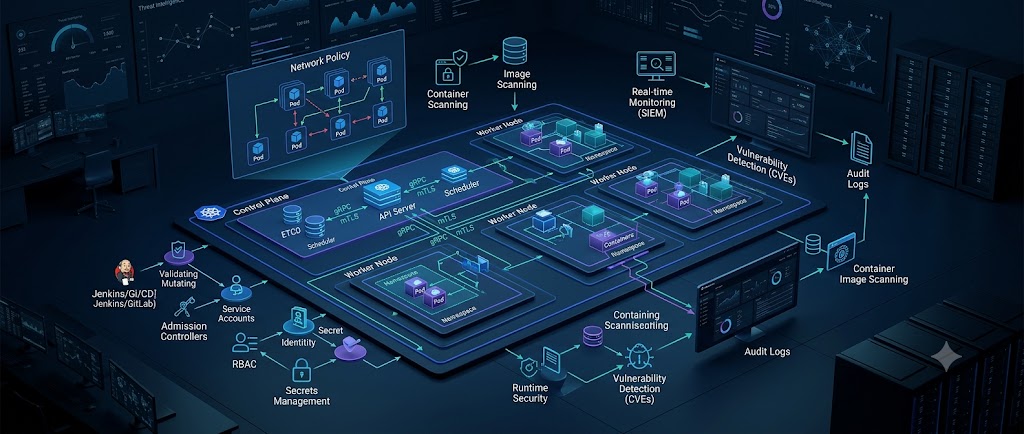
- Incorrect Kubernetes configurations
- Secrets stored in source code or configuration files
Misconfiguration does not always mean the cloud provider itself is insecure. In many cases, the provider supplies the necessary security controls, but the customer configures those controls incorrectly.
NIST’s cloud access-control guidance emphasizes that access requirements differ across IaaS, PaaS, and SaaS environments, making proper authorization and policy design an important part of cloud security.
Why Cloud Misconfiguration Is Dangerous
Traditional infrastructure often required an attacker to penetrate several layers before reaching sensitive resources.
Cloud environments can reduce those barriers when resources are accidentally exposed.
For example:
Internet
   |
   v
Public Storage Bucket
   |
   v
Sensitive Customer Data
There may be no software vulnerability involved.
The attacker simply discovers that the storage resource is publicly accessible.
The same principle applies to databases, virtual machines, Kubernetes dashboards, administrative interfaces, APIs, and cloud management consoles.
A misconfiguration can therefore turn a well-designed application into an exposed system.
Configuration Errors Can Scale Quickly
Cloud environments are highly automated.
A mistake in a manually configured server may affect one machine. A mistake in infrastructure-as-code or an organization-wide policy can affect hundreds of resources.
For example:
Incorrect Terraform Policy
        |
        v
CI/CD Pipeline
        |
        v
50 Cloud Accounts
        |
        v
Thousands of Resources
This is why cloud security requires automated configuration validation rather than relying entirely on manual reviews.
NIST has highlighted the value of automating cloud configuration and continuously monitoring environments for security-control gaps and misconfigurations.
Common Types of Cloud Misconfiguration
1. Publicly Exposed Cloud Storage
Public storage is one of the most recognizable cloud security mistakes.
An organization may create a bucket for internal documents but accidentally grant public read access.
A simplified example looks like:
Bucket: company-internal-data

Expected:
Employees → Read

Actual:
Internet → Read
If the bucket contains customer records, backups, source code, invoices, logs, or internal documents, the impact can be serious.
Google Cloud recommends using least privilege for storage resources and warns that public principals should only be used when public access is actually intended.
Google Cloud also provides public access prevention to prevent applicable storage resources from being made publicly accessible through IAM policies or ACLs.
2. Excessive IAM Permissions
IAM determines who can access cloud resources and what actions they can perform.
A common mistake is assigning broad permissions when a smaller role would be sufficient.
For example:
Application
   |
   +--> Needs: Read Object
   |
   +--> Receives: Storage Administrator
The application may only need to read files, but the assigned role may allow it to modify permissions, delete objects, or manage the entire storage service.
If the application credentials are compromised, the attacker inherits those privileges.
3. Open Security Groups and Firewalls
Cloud firewalls and security groups control network traffic.
A dangerous configuration might allow:
Source: 0.0.0.0/0
Port: 22
Action: Allow
This exposes SSH to the entire internet.
Similar problems can occur with:
- RDP
- Database ports
- Kubernetes APIs
- Administrative web panels
- Internal APIs
- Monitoring interfaces
Not every internet-facing service is automatically vulnerable, but unnecessary exposure increases the attack surface.
4. Exposed Cloud Databases
Databases should generally not be directly reachable from the public internet unless there is a specific security architecture and business requirement for that exposure.
A poorly configured database may allow:
Internet
   |
   v
Public IP
   |
   v
Database
A safer architecture might use:
Internet
   |
   v
Application/API
   |
   v
Private Network
   |
   v
Database
Network segmentation, private endpoints, firewall policies, authentication, and encryption should work together rather than relying on a single control.
Microsoft’s current Azure Storage guidance similarly recommends reducing unnecessary public network exposure and using private endpoints where appropriate.
5. Disabled or Incomplete Logging
Security logs are essential for detection and investigation.
A cloud environment may be configured with strong access controls but still be difficult to investigate if important activity is not logged.
Security teams should consider monitoring:
- Authentication events
- IAM changes
- Role changes
- Storage access
- Network changes
- Firewall modifications
- Resource creation
- Resource deletion
- Key creation
- Key rotation
- Security-policy changes
- Logging configuration changes
MITRE ATT&CK currently documents detection approaches for cloud activity, including monitoring cloud service modifications and changes that can affect logging visibility.
6. Default Accounts and Credentials
Default accounts are frequently overlooked during deployment.
Attackers routinely search for:
- Default usernames
- Default passwords
- Vendor-created accounts
- Test accounts
- Temporary administrator accounts
- Old service identities
OWASP includes unchanged default accounts and passwords among examples of security misconfiguration.
Every default identity should be removed, disabled, or secured before production deployment.
7. Overly Permissive API Access
Cloud applications rely heavily on APIs.
A developer may accidentally configure an API endpoint so that authenticated users can access resources belonging to other users.
For example:
GET /api/customer/1001The application should verify that the requester has permission to access customer 1001.
Simply checking whether the user is authenticated is not sufficient.
This is particularly important for cloud-native applications because APIs frequently connect users to databases, storage systems, queues, serverless functions, and internal services.
8. Public Management Interfaces
Administrative dashboards should not be unnecessarily exposed to the public internet.
Examples include:
- Cloud management consoles
- Kubernetes dashboards
- Database administration panels
- Monitoring interfaces
- CI/CD dashboards
- Internal management APIs
MITRE ATT&CK documents Cloud Service Dashboard as a discovery technique in which adversaries can use cloud dashboards and compromised credentials to gather information about cloud resources.
Strong authentication, conditional access, network restrictions, privileged access controls, and monitoring should protect administrative interfaces.
How Attackers Exploit Cloud Misconfigurations
Cloud attacks often involve multiple stages rather than a single misconfiguration.
A simplified attack path might look like this:
Reconnaissance
      |
      v
Identify Exposed Resource
      |
      v
Gain Initial Access
      |
      v
Enumerate Cloud Environment
      |
      v
Find Excessive Permissions
      |
      v
Privilege Escalation
      |
      v
Access Sensitive Data
      |
      v
Maintain Access
MITRE ATT&CK tracks techniques for cloud infrastructure discovery and cloud service discovery, reflecting how adversaries may enumerate cloud resources after obtaining access.
Example: Stolen Cloud Credentials
Consider an attacker who obtains credentials for a low-privileged cloud account.
The account should only be able to view a small set of resources.
However, the organization accidentally assigned it an administrative role.
The attacker can now potentially:
- Enumerate cloud resources.
- Identify storage systems.
- Inspect IAM configuration.
- Search for sensitive workloads.
- Modify security policies.
- Create additional access paths.
- Access sensitive resources.
The initial compromise may have involved credential theft, but the excessive permissions make the impact significantly worse.
Real-World Cloud Misconfiguration Scenario
Imagine a company deploying a customer portal.
The application stores uploaded documents in cloud object storage.
The developer creates a bucket and configures it for easy application access.
During testing, public access is enabled.
The application goes into production, but the setting is never changed.
Months later, an external researcher discovers that files can be accessed without authentication.
The core application may have strong authentication and secure code.
The actual vulnerability exists in the cloud configuration.
This example demonstrates why cloud security must include infrastructure configuration, not just application security.
Cloud Misconfiguration Risks in AWS, Azure, and Google Cloud
Although cloud providers use different terminology and interfaces, many configuration risks are conceptually similar.
AWS
Common areas to review include:
- IAM policies
- S3 bucket access
- Security groups
- VPC configuration
- CloudTrail logging
- KMS permissions
- Lambda execution roles
- Public IP exposure
- Root account controls
Microsoft Azure
Security teams should review:
- Azure RBAC
- Storage account access
- Network Security Groups
- Public network access
- Key Vault permissions
- Managed identities
- Azure Policy
- Activity Logs
- Private endpoints
Microsoft’s current cloud security guidance includes policies for restricting public storage access and limiting network exposure.
Google Cloud
Important areas include:
- IAM roles
- Cloud Storage permissions
- VPC firewall rules
- Service accounts
- Organization policies
- Audit Logs
- Cloud SQL exposure
- Workload identities
- Public access prevention
Google recommends least privilege for Cloud Storage permissions and provides organization-level controls to prevent unintended public access.
Cloud Misconfiguration Prevention Best Practices
1. Use Least Privilege
Every identity should receive only the permissions required for its job.
This includes:
- Employees
- Administrators
- Applications
- Service accounts
- CI/CD pipelines
- Containers
- Serverless functions
Avoid using administrator roles simply because they are convenient.
2. Deny Public Access by Default
Public access should be an explicit business decision.
Do not make cloud storage, databases, or administrative interfaces public simply to simplify development.
Where available, use organizational controls that prevent public exposure.
3. Use Infrastructure as Code
Infrastructure as Code allows organizations to define cloud resources in version-controlled configurations.
Benefits include:
- Repeatability
- Code review
- Change tracking
- Automated testing
- Standardized security baselines
- Easier rollback
However, IaC can also spread insecure configurations quickly. Every template should therefore undergo security validation before deployment.
4. Implement Policy as Code
Policy-as-code allows organizations to define security requirements that can be automatically evaluated.
Examples:
Storage must not be public
Database must not have a public IP
MFA required for privileged users
Encryption must be enabled
SSH must not be open to 0.0.0.0/0
Logging must be enabled
This converts security requirements into enforceable controls.
5. Continuously Monitor Configuration Drift
A secure configuration today may become insecure tomorrow.
Changes can occur because of:
- Developer deployments
- Emergency fixes
- Infrastructure updates
- New cloud services
- Manual console changes
- Automation
- Compromised administrator accounts
Continuous monitoring helps identify when resources move away from the approved baseline.
6. Centralize Security Logging
Cloud activity should feed into centralized monitoring where practical.
A SIEM can correlate:
Identity Event
      +
Cloud Configuration Change
      +
Network Activity
      +
Application Activity
      =
Security Investigation
This provides much more context than analyzing individual logs.
7. Perform Regular Cloud Security Reviews
Organizations should regularly review:
- IAM permissions
- Storage access
- Network exposure
- Security groups
- Firewall rules
- Encryption
- Logging
- Public resources
- Service accounts
- API permissions
- Backup configuration
- Secrets management
Reviews should include both automated scanning and manual validation.
Cloud Misconfiguration Testing During VAPT
Cloud misconfiguration assessment is an important part of modern penetration testing and VAPT.
A tester should evaluate the security posture without unnecessarily disrupting production systems.
Identity and Access Testing
Review whether:
- Users have excessive privileges
- Service accounts have unnecessary permissions
- Privileged roles are restricted
- MFA is enforced
- Dormant accounts remain active
- Access policies are overly broad
NIST emphasizes that access-control policies and their implementation should be systematically verified because faulty policies and implementation flaws can result in serious vulnerabilities.
Network Testing
Review:
- Internet-facing services
- Open management ports
- Security groups
- Firewall rules
- Public IP addresses
- Private endpoint configuration
- Network segmentation
Storage Testing
Check whether:
- Buckets are public
- Objects are publicly readable
- Anonymous access is enabled
- Sensitive backups are exposed
- Access policies are overly permissive
Logging Testing
Verify whether security-relevant activities are captured and retained appropriately.
The assessment should also determine whether attackers could disable or modify logging without generating an alert.
Tools for Detecting Cloud Misconfiguration
Organizations can use a combination of native cloud services and third-party security tooling.
Common categories include:
- Cloud Security Posture Management (CSPM)
- Cloud configuration scanners
- Infrastructure-as-code scanners
- IAM analyzers
- Vulnerability scanners
- SIEM platforms
- Cloud-native security services
- Policy-as-code frameworks
- Container security scanners
The most effective approach is usually layered.
For example:
Developer Commit
      |
      v
IaC Security Scan
      |
      v
CI/CD Security Gate
      |
      v
Cloud Policy Validation
      |
      v
Runtime Monitoring
      |
      v
Security Operations
This catches configuration problems at multiple stages instead of waiting until production.
Cloud Misconfiguration Security Checklist
Use this checklist as a practical starting point:
- Disable unnecessary public access
- Review cloud IAM permissions
- Enforce least privilege
- Enable MFA for privileged accounts
- Protect root and administrator accounts
- Remove unused identities
- Secure service accounts
- Restrict security groups
- Close unnecessary ports
- Keep databases on private networks where appropriate
- Enable encryption
- Protect encryption keys
- Enable centralized logging
- Monitor IAM changes
- Monitor security-policy changes
- Protect cloud management interfaces
- Scan infrastructure as code
- Implement policy as code
- Monitor configuration drift
- Review public storage regularly
- Test cloud configurations during VAPT
- Maintain an inventory of cloud resources
- Establish secure configuration baselines
- Automate remediation for high-risk findings
Cloud Security and the Shared Responsibility Model
Cloud security is shared between the provider and the customer, but the exact responsibilities depend on the service model.
In general:
Cloud Provider
    |
    +--> Physical infrastructure
    +--> Core cloud platform
    +--> Underlying services

Customer
    |
    +--> Identities
    +--> Data
    +--> Permissions
    +--> Application configuration
    +--> Network configuration
The exact division varies between IaaS, PaaS, and SaaS.
NIST’s cloud access-control guidance specifically addresses the different security considerations associated with these service models.
Organizations should therefore understand which security controls they are responsible for instead of assuming that the cloud provider automatically secures every configuration.
Why Automation Matters
Manual cloud security reviews do not scale well.
An organization with five servers may manually inspect configuration settings.
An enterprise with thousands of resources across multiple cloud accounts cannot realistically inspect every setting every day.
Automation can continuously evaluate:
Resource
   |
   v
Configuration
   |
   v
Security Policy
   |
   +---- Compliant
   |
   +---- Non-Compliant
             |
             v
          Alert
             |
             v
       Remediation
Automated controls should be combined with human review for high-impact decisions.
Career Opportunities in Cloud Security
Cloud misconfiguration knowledge is increasingly useful for cybersecurity professionals.
Relevant roles include:
- Cloud Security Engineer
- Cloud Security Analyst
- DevSecOps Engineer
- Security Operations Analyst
- Penetration Tester
- Cloud Penetration Tester
- Application Security Engineer
- Security Consultant
- IAM Engineer
- Cloud Architect
- Security Engineer
Security professionals should understand both offensive and defensive perspectives.
A penetration tester should know how configuration mistakes expose resources.
A defender should understand how those exposures can be detected and prevented.
For professionals building practical skills, “https://academy.pentesthint.com/” cyber security training and “https://vuln.pentesthint.com/” cyber security labs can provide useful environments for developing hands-on security knowledge.
Frequently Asked Questions
What are cloud misconfiguration risks?
Cloud misconfiguration risks are security risks caused by incorrectly configured cloud resources, permissions, networks, identities, storage, applications, logging, or security controls.
What is the most common cloud misconfiguration?
Common examples include publicly exposed storage, excessive IAM permissions, open firewall rules, exposed databases, insecure APIs, and insufficient logging. The specific risk varies by environment.
Can cloud misconfiguration lead to a data breach?
Yes. A publicly accessible storage resource or database can expose sensitive information without requiring the attacker to exploit a software vulnerability.
How can organizations prevent cloud misconfiguration?
Organizations should use secure configuration baselines, least privilege, infrastructure as code, policy as code, continuous monitoring, automated security checks, centralized logging, and regular cloud security assessments.
What is CSPM?
Cloud Security Posture Management, or CSPM, refers to technologies and processes used to identify, assess, and help remediate cloud security configuration problems across cloud environments.
Are cloud misconfigurations included in penetration testing?
Yes. Cloud penetration tests and VAPT assessments can examine IAM, network exposure, storage permissions, public resources, API authorization, security controls, and other configuration weaknesses, provided the testing is properly authorized.
Why is least privilege important in cloud security?
Least privilege limits what an identity can access or modify. If an account or application is compromised, restricted permissions can reduce the attacker’s ability to access sensitive resources or escalate privileges.
How often should cloud configurations be reviewed?
Cloud configurations should be continuously monitored where possible, with formal security reviews performed regularly and whenever major architectural, identity, application, or infrastructure changes occur.
Conclusion
Cloud platforms provide organizations with speed, scalability, and flexibility, but those advantages also introduce configuration complexity.
The most dangerous cloud misconfiguration risks are often simple mistakes: a public storage bucket, an unrestricted firewall rule, an overly powerful IAM role, an exposed database, or disabled security logging.
The solution is not to avoid cloud technology. It is to build security into the way cloud infrastructure is designed, deployed, monitored, and maintained.
Organizations should establish secure baselines, enforce least privilege, restrict public exposure, protect privileged identities, automate configuration checks, monitor changes, and regularly test their cloud environments.
Cloud security should also extend beyond the infrastructure itself. Applications, APIs, containers, identities, CI/CD pipelines, and infrastructure-as-code templates all contribute to the overall attack surface.
For organizations that need deeper security assessments, “https://pentesthint.com/” PentestHint can help teams understand their exposure through cybersecurity resources, security assessments, and “https://pentesthint.com/” VAPT services.
The key principle is simple: a cloud environment is only as secure as its most dangerous configuration.