
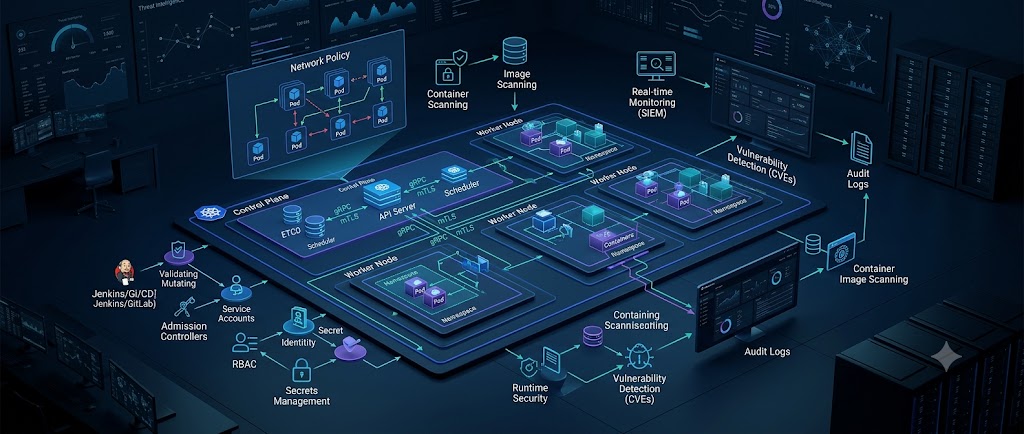
Kubernetes has become a core platform for running modern cloud-native applications, but its flexibility also creates a large security surface. Kubernetes security best practices are no longer limited to protecting the Kubernetes API server. Organizations must secure workloads, container images, identities, secrets, network traffic, nodes, CI/CD pipelines, and the underlying cloud environment.
A poorly configured Kubernetes cluster can turn a small application vulnerability into a much larger compromise. Excessive RBAC permissions, privileged containers, exposed dashboards, weak network controls, leaked service-account credentials, and vulnerable container images can all provide attackers with paths toward lateral movement or privilege escalation.
Kubernetes itself provides several important security mechanisms, including Role-Based Access Control (RBAC), Pod Security Admission, Secrets, NetworkPolicy, admission controls, audit logging, and security contexts. The Kubernetes documentation recommends combining these controls rather than relying on a single security mechanism.
This guide explains how to apply those controls in practical environments, from development clusters to production infrastructure.
What Is Kubernetes Security?
Kubernetes security is the process of protecting a Kubernetes cluster, its control plane, worker nodes, workloads, identities, applications, data, and communication channels from unauthorized access and abuse.
A Kubernetes environment typically contains several security boundaries:
- Kubernetes API server
- Control-plane components
- Worker nodes
- Pods and containers
- Namespaces
- Service accounts
- RBAC permissions
- Container registries
- Secrets
- Network communication
- CI/CD systems
- Cloud infrastructure
An attacker does not necessarily need direct access to the control plane to compromise a cluster.
For example, an attacker may first exploit a vulnerable web application running inside a pod. If that pod has excessive privileges or a powerful service-account token, the attacker may be able to interact with the Kubernetes API and move deeper into the environment.
That is why Kubernetes security should be treated as a layered defense strategy.
Why Kubernetes Security Matters
Kubernetes simplifies application deployment, scaling, and orchestration, but its large feature set introduces additional configuration and security considerations.
A production cluster may have hundreds of workloads, multiple namespaces, automated deployments, cloud identities, internal APIs, external services, and numerous service accounts.
A single overly permissive configuration can therefore have a significant impact.
Common Kubernetes security risks include:
- Excessive RBAC permissions
- Privileged containers
- Containers running as root
- Missing NetworkPolicies
- Exposed Kubernetes API endpoints
- Vulnerable container images
- Hardcoded credentials
- Poor Secret management
- Unnecessary service-account tokens
- Weak admission controls
- Unpatched Kubernetes nodes
- Insecure cloud metadata access
- Poor audit logging
- Container escape vulnerabilities
NIST’s container security guidance also emphasizes risks around image security, isolation, orchestration, registries, and runtime environments.
For organizations operating sensitive workloads, Kubernetes security should therefore be included throughout the software development and deployment lifecycle.
Kubernetes Security Architecture
A useful way to understand Kubernetes security is to divide it into several layers.
1. Control Plane Security
The control plane manages the cluster and includes components such as:
- API server
- etcd
- Scheduler
- Controller Manager
Compromising the control plane can potentially give an attacker extensive control over the cluster.
Protect API-server access, restrict administrative privileges, protect certificates, and secure etcd.
2. Workload Security
Pods should run with the minimum privileges required by the application.
Avoid unnecessary:
privileged: true- Host networking
- Host PID access
- Host filesystem mounts
- Root privileges
- Linux capabilities
3. Network Security
Use NetworkPolicies to restrict communication between workloads.
Instead of allowing every pod to communicate with every other pod, define explicit ingress and egress requirements.
4. Identity and Access Security
RBAC should follow least privilege.
Users, automation systems, and service accounts should receive only the permissions required for their jobs.
5. Data and Secret Security
Sensitive credentials should not be embedded inside container images, Git repositories, ConfigMaps, or application source code.
Kubernetes Secrets should be protected with appropriate RBAC and encryption at rest.
1. Implement Strong RBAC Policies
Role-Based Access Control is one of the most important Kubernetes security controls.
RBAC determines which users, groups, and service accounts can perform actions against Kubernetes resources.
For example, instead of giving a developer full cluster administrator privileges, create a namespace-specific Role that allows only the required actions.
apiVersion: rbac.authorization.k8s.io/v1
kind: Role
metadata:
  namespace: production
  name: app-reader
rules:
- apiGroups: [""]
  resources: ["pods"]
  verbs: ["get", "list", "watch"]
This role allows read access to pods within the production namespace without granting cluster-wide administrative permissions.
Follow the Principle of Least Privilege
Avoid permissions such as:
*
*
when more specific permissions are sufficient.
Be especially careful with:
createupdatepatchdeleteimpersonate- permissions to create or modify RBAC resources
Kubernetes documentation specifically recommends namespace-level permissions and using RoleBindings instead of ClusterRoleBindings whenever possible.
Review RBAC Regularly
RBAC should not be configured once and forgotten.
Review:
- Unused RoleBindings
- Old employee accounts
- Service accounts
- ClusterRoleBindings
- Excessive permissions
- Permissions that enable privilege escalation
2. Secure Kubernetes Service Accounts
Service accounts allow workloads to authenticate to the Kubernetes API.
One common mistake is automatically mounting service-account credentials into every pod.
If an application does not need Kubernetes API access, disable automatic token mounting.
apiVersion: v1
kind: Pod
metadata:
  name: web-app
spec:
  automountServiceAccountToken: false
  containers:
  - name: web
    image: example/web:1.0
This reduces the value of a compromised pod because the attacker does not automatically receive a Kubernetes API credential.
Kubernetes security guidance recommends disabling automatic service-account token mounting when workloads do not require it.
For workloads that genuinely need API access, use a dedicated service account with narrowly scoped permissions.
3. Enforce Pod Security Standards
A container should not receive more operating-system privileges than it needs.
Kubernetes provides Pod Security Standards with three levels:
- Privileged
- Baseline
- Restricted
The Restricted profile provides the strongest default restrictions.
Pod Security Admission has been stable since Kubernetes v1.25 and can enforce Pod Security Standards at the namespace level.
A practical rollout strategy is:
- Start with
warn - Enable
audit - Fix violating workloads
- Move appropriate namespaces to
enforce
This approach reduces the chance of breaking production workloads during a security migration.
For example:
apiVersion: v1
kind: Namespace
metadata:
  name: production
  labels:
    pod-security.kubernetes.io/enforce: restricted
    pod-security.kubernetes.io/audit: restricted
    pod-security.kubernetes.io/warn: restricted
Not every workload can immediately operate under the Restricted profile. Legacy applications may require additional capabilities or host integration.
Those exceptions should be documented and minimized.
4. Run Containers as Non-Root Users
Running an application as root inside a container increases the potential impact of a container compromise.
Whenever possible, run applications with a dedicated unprivileged UID.
Example:
securityContext:
  runAsNonRoot: true
  runAsUser: 1000
  allowPrivilegeEscalation: false
You should also consider:
readOnlyRootFilesystem: true- Dropping unnecessary Linux capabilities
- Seccomp profiles
- AppArmor
- SELinux where supported
Kubernetes security guidance recommends using security contexts and OS-level controls such as Seccomp, AppArmor, and SELinux where appropriate.
Example Security Context
securityContext:
  runAsNonRoot: true
  allowPrivilegeEscalation: false
  readOnlyRootFilesystem: true
  capabilities:
    drop:
      - ALL
The exact configuration should be tested against the application because some software legitimately requires additional privileges.
5. Secure Kubernetes Secrets
Kubernetes Secrets are designed to store sensitive information such as passwords, tokens, and keys.
However, simply putting credentials into a Kubernetes Secret does not automatically make them secure.
A common misconception is that Base64 encoding provides encryption.
It does not.
Base64 is an encoding mechanism, not a confidentiality mechanism.
By default, Secret data is stored in etcd without encryption at rest unless encryption is configured. Kubernetes recommends enabling encryption at rest and applying least-privilege access to Secrets.
Protect Secrets With RBAC
Avoid giving broad access such as:
resources:
- secrets
verbs:
- get
- list
- watch
list access can be particularly dangerous because it can expose multiple secrets.
Consider External Secret Management
For sensitive production environments, organizations may integrate Kubernetes with external secret-management systems.
Examples include:
- Cloud secret managers
- Enterprise vault systems
- Secrets Store CSI Driver
- Hardware-backed key management
The goal is to reduce unnecessary exposure of long-lived credentials inside the cluster.
6. Use NetworkPolicies
By default, Kubernetes networking can allow workloads to communicate broadly depending on the networking implementation and configuration.
NetworkPolicies provide a way to define permitted traffic.
For example, a frontend may need to communicate with an API service, while the frontend should not directly communicate with a database.
A simple policy might look like:
apiVersion: networking.k8s.io/v1
kind: NetworkPolicy
metadata:
  name: allow-api
  namespace: production
spec:
  podSelector:
    matchLabels:
      app: api
  policyTypes:
  - Ingress
  ingress:
  - from:
    - podSelector:
        matchLabels:
          app: frontend
This creates a basic application-level network boundary.
Kubernetes’ security checklist recommends ingress and egress NetworkPolicies for workloads where appropriate.
Don’t Forget Egress
Security teams often focus only on inbound traffic.
Egress controls are equally important.
If an attacker compromises a pod, unrestricted outbound access could allow:
- Command-and-control communication
- Data exfiltration
- Access to cloud metadata services
- Scanning of internal systems
Restrict outbound traffic to only what the application actually needs.
7. Secure Container Images
Container security starts before the image reaches Kubernetes.
A vulnerable image can introduce security problems even if the Kubernetes configuration itself is properly hardened.
A secure container image lifecycle should include:
- Use trusted base images.
- Keep dependencies updated.
- Remove unnecessary packages.
- Scan images for vulnerabilities.
- Generate software bills of materials where appropriate.
- Sign trusted images.
- Verify images before deployment.
Kubernetes’ application security checklist recommends image scanning and container image signing as part of a stronger workload security strategy.
Avoid the latest Tag
Instead of:
image: nginx:latestprefer a controlled version:
image: nginx:1.29.1For stronger supply-chain controls, organizations can also pin images by immutable digest.
8. Secure the Kubernetes API Server
The Kubernetes API server is one of the highest-value targets in a cluster.
Protect it by:
- Restricting network access
- Using strong authentication
- Applying RBAC
- Removing unnecessary anonymous access
- Protecting TLS certificates
- Monitoring API requests
- Enabling appropriate audit logging
Avoid exposing the API server directly to the public internet unless there is a well-designed reason and strong access controls around it.
Kubernetes security guidance also recommends reviewing unauthenticated access and avoiding unnecessary use of highly privileged identities such as system:masters.
9. Protect etcd
etcd stores critical Kubernetes state.
Depending on the cluster configuration, this can include:
- Secrets
- Configuration
- Workload definitions
- RBAC information
- Cluster state
An attacker who gains unauthorized access to etcd may be able to obtain extremely sensitive information.
Recommended controls include:
- Restrict etcd network access
- Enable TLS
- Protect client certificates
- Encrypt sensitive data at rest
- Limit administrative access
- Secure backups
- Monitor access
Backups should receive the same security attention as the production etcd database.
A secure cluster with an insecure backup can still result in a major data exposure.
10. Keep Kubernetes and Nodes Updated
Kubernetes security is closely tied to the security of the underlying operating system and container runtime.
Maintain an update process for:
- Kubernetes components
- Linux kernel
- Container runtime
- CNI plugins
- CSI drivers
- Ingress controllers
- Admission controllers
- Monitoring components
- Third-party operators
Do not focus only on Kubernetes version updates.
A vulnerable third-party controller running with cluster-level privileges can be just as dangerous.
Create a vulnerability-management process that tracks both Kubernetes components and the wider cloud-native stack.
11. Restrict Host-Level Access
Some Kubernetes features allow pods to interact with the underlying node.
Examples include:
hostNetworkhostPIDhostPath- Privileged containers
- Host device access
These capabilities can significantly increase the impact of a compromised workload.
For example:
securityContext:
  privileged: true
should not be used casually.
Kubernetes documentation specifically recommends limiting host access and running normal application workloads with restricted privileges.
If a workload legitimately requires host-level access, isolate it and carefully control which nodes can run it.
12. Apply Resource Limits
Security is not only about confidentiality and access control.
Availability matters too.
A compromised or malfunctioning application could consume excessive CPU or memory and affect other workloads.
Define appropriate resource requests and limits.
resources:
  requests:
    cpu: "250m"
    memory: "256Mi"
  limits:
    cpu: "500m"
    memory: "512Mi"
Resource controls can reduce the impact of certain denial-of-service scenarios and prevent one workload from consuming disproportionate node resources. Kubernetes’ security checklist includes CPU and memory resource controls among its workload-security recommendations.
13. Secure the CI/CD Pipeline
Kubernetes security can be defeated before a workload reaches the cluster.
An attacker who compromises the CI/CD pipeline may inject malicious code into a trusted image.
Secure the software supply chain by implementing:
- Protected Git branches
- Code review
- Dependency scanning
- Secret scanning
- Container image scanning
- SBOM generation
- Image signing
- Artifact integrity checks
- Restricted CI/CD credentials
- Deployment approvals for sensitive environments
CI/CD service accounts should also follow least privilege.
A deployment pipeline that can modify every namespace and every workload represents a significant attack surface.
14. Use Admission Controls
Admission controls allow organizations to validate Kubernetes API requests before resources are accepted.
They can enforce organizational security requirements such as:
- Approved container registries
- Required labels
- Security contexts
- Resource limits
- Prohibited privileged containers
- Required image signatures
- Restricted host access
Kubernetes supports admission mechanisms and policy extensions that can validate or mutate API requests.
For example, an organization could reject deployments that attempt to run:
privileged: trueunless the workload has been explicitly approved.
This turns security requirements from documentation into enforceable controls.
15. Enable Kubernetes Audit Logging
You cannot investigate what you cannot see.
Audit logging can help security teams understand:
- Who accessed the API
- Which resources were modified
- When changes occurred
- Which service account performed an action
- Whether suspicious activity occurred
Useful events to monitor include:
- Creation of privileged pods
- RBAC changes
- Secret access
- Service-account changes
- ClusterRole modifications
- Namespace changes
- Unusual API activity
- Creation of new workloads
Audit logs should be sent to a protected logging system rather than relying solely on local cluster storage.
16. Monitor for Suspicious Runtime Activity
Traditional vulnerability scanning is not enough.
Runtime monitoring can identify suspicious behavior such as:
- Unexpected shell execution
- New processes inside containers
- Access to sensitive host paths
- Unexpected outbound connections
- Privilege escalation attempts
- Cryptocurrency mining
- Reverse shells
- Abnormal API activity
For larger environments, Kubernetes runtime security should integrate with centralized logging, SIEM, threat detection, and incident-response workflows.
Security teams should define alerts based on actual risk rather than generating alerts for every minor Kubernetes event.
17. Segment Workloads With Namespaces
Namespaces provide logical separation inside a cluster.
For example:
production
staging
development
monitoring
security
Namespaces can help separate:
- RBAC permissions
- Secrets
- Network policies
- Resource quotas
- Pod security requirements
However, namespaces should not be treated as a complete security boundary.
Use them together with RBAC, NetworkPolicies, Pod Security Standards, node isolation, and other controls.
18. Protect Cloud Metadata Services
Cloud-hosted Kubernetes environments introduce another important security concern: cloud identity.
A compromised pod may attempt to access cloud metadata endpoints or credentials associated with the node.
This can potentially allow an attacker to move from a Kubernetes workload into cloud infrastructure.
Kubernetes security guidance recommends limiting pod access to cloud metadata services and avoiding the use of provisioning data for delivering secrets.
Use workload identity mechanisms provided by your cloud platform where appropriate, and avoid giving nodes unnecessarily broad cloud permissions.
19. Perform Regular Kubernetes Security Assessments
Security configuration changes over time.
A cluster that was secure six months ago may become risky after:
- New deployments
- New service accounts
- New operators
- RBAC changes
- Kubernetes upgrades
- New namespaces
- CI/CD changes
- New cloud integrations
Regular security assessments should examine both configuration and actual attack paths.
A Kubernetes security assessment can include:
Configuration Review
Check:
- RBAC
- Pod Security
- Secrets
- NetworkPolicies
- API server exposure
- etcd configuration
- Node configuration
Vulnerability Assessment
Identify vulnerable:
- Container images
- Kubernetes components
- Operating systems
- Dependencies
- Third-party controllers
Penetration Testing
Where authorized, security professionals can test realistic attack paths such as:
Web Application
      ↓
Compromised Pod
      ↓
Service Account
      ↓
Kubernetes API
      ↓
Privilege Escalation
      ↓
Sensitive Workload
This approach helps organizations understand the real impact of a misconfiguration rather than simply producing a list of findings.
For organizations looking to strengthen practical cybersecurity skills, PentestHint also provides security-focused resources and services.
Kubernetes Security Tools
Several tools can help security teams assess and improve Kubernetes environments.
Kubescape
Useful for Kubernetes posture assessment and configuration checks.
kube-bench
Helps evaluate Kubernetes configurations against CIS Kubernetes Benchmark recommendations.
Trivy
Can scan container images, filesystems, repositories, and other artifacts for vulnerabilities and security issues.
Falco
Provides runtime detection capabilities for suspicious activity in containerized environments.
Kyverno
Can enforce Kubernetes policies using Kubernetes-native resources.
OPA Gatekeeper
Provides policy-based admission controls using Open Policy Agent.
No single tool provides complete Kubernetes security.
A mature security program combines configuration assessment, vulnerability scanning, runtime detection, identity controls, network controls, and continuous monitoring.
Kubernetes Security Checklist
Before deploying a production Kubernetes workload, review the following checklist:
Cluster Security
- Restrict Kubernetes API access
- Enable strong authentication
- Protect control-plane certificates
- Secure etcd
- Encrypt sensitive data at rest
- Enable audit logging
- Keep Kubernetes updated
Identity and RBAC
- Apply least privilege
- Minimize ClusterRoleBindings
- Review service accounts
- Disable unnecessary service-account token mounting
- Review permissions regularly
- Avoid unnecessary
system:mastersaccess
Pod Security
- Avoid privileged containers
- Run containers as non-root
- Disable privilege escalation
- Drop unnecessary Linux capabilities
- Use Seccomp where appropriate
- Apply Pod Security Standards
- Avoid unnecessary host mounts
Network Security
- Deploy NetworkPolicies
- Restrict ingress
- Restrict egress
- Segment sensitive workloads
- Restrict cloud metadata access
Secrets
- Never hardcode credentials
- Encrypt Secrets at rest
- Restrict Secret access
- Avoid unnecessary
listpermissions - Consider external secret management
- Rotate credentials regularly
Supply Chain
- Scan container images
- Use trusted base images
- Keep dependencies updated
- Sign images
- Verify image provenance
- Protect CI/CD credentials
- Generate SBOMs where appropriate
Common Kubernetes Security Mistakes
Even experienced teams can make configuration mistakes.
Giving Developers Cluster-Admin
This is convenient during development but dangerous in production.
Use namespace-specific roles instead.
Running Everything as Root
Root access is unnecessary for many applications.
Move applications toward non-root execution.
Using Secrets Without Encryption
Kubernetes Secrets are not automatically equivalent to encrypted storage.
Configure encryption at rest and restrict access.
Allowing Unrestricted Pod-to-Pod Traffic
A compromised workload should not automatically be able to communicate with every service.
Use NetworkPolicies.
Trusting Container Images
A container image can contain vulnerable packages or malicious code.
Scan and verify images before deployment.
Ignoring the CI/CD Pipeline
A secure cluster does not help if an attacker can compromise the deployment pipeline and push malicious workloads.
How to Build a Kubernetes Security Strategy
A practical Kubernetes security program can be implemented progressively.
Phase 1: Visibility
Start by identifying:
- Clusters
- Namespaces
- Workloads
- Service accounts
- RBAC permissions
- Container images
- External access points
You cannot secure assets you cannot see.
Phase 2: Basic Hardening
Implement:
- RBAC least privilege
- Pod Security Standards
- NetworkPolicies
- Non-root containers
- Secret protection
- API-server restrictions
Phase 3: Supply Chain Security
Add:
- Image scanning
- Dependency scanning
- SBOMs
- Image signing
- CI/CD security
Phase 4: Detection
Implement:
- Audit logging
- Runtime monitoring
- Centralized logs
- SIEM integration
- Security alerts
Phase 5: Continuous Assessment
Regularly reassess:
- RBAC
- Cluster configuration
- Images
- Workloads
- Network exposure
- Cloud permissions
This turns Kubernetes security from a one-time hardening project into an ongoing security process.
FAQs
What are the most important Kubernetes security best practices?
The most important practices include least-privilege RBAC, Pod Security Standards, NetworkPolicies, secure Secrets management, non-root containers, container image scanning, API-server protection, audit logging, and regular patching.
Why is RBAC important in Kubernetes?
RBAC controls which users, groups, and service accounts can interact with Kubernetes resources. Properly configured RBAC limits an attacker’s ability to move from a compromised workload to more sensitive resources.
Are Kubernetes Secrets encrypted by default?
Kubernetes Secrets are not encrypted at rest by default in etcd. Organizations should configure encryption at rest and use least-privilege RBAC for Secret access.
Should Kubernetes containers run as root?
Generally, application containers should run as non-root users whenever possible. Running as non-root reduces the privileges available to an attacker if the application is compromised.
What is Pod Security Admission?
Pod Security Admission is a built-in Kubernetes admission controller that can enforce Pod Security Standards. It supports the Privileged, Baseline, and Restricted policy levels and can operate in warn, audit, and enforce modes.
Why are NetworkPolicies important?
NetworkPolicies allow teams to control which pods can communicate with one another and with external networks. They can reduce lateral movement after a workload is compromised.
How often should Kubernetes security be reviewed?
Security should be reviewed continuously, with formal configuration and access reviews performed regularly. Major cluster changes, Kubernetes upgrades, new workloads, and new integrations should also trigger security reviews.
Can Kubernetes be completely secure?
No environment can be guaranteed to be completely secure. The objective is to reduce attack surface, limit privileges, prevent common attack paths, detect suspicious behavior, and minimize the impact of a compromise.
Conclusion
Kubernetes security requires more than securing the Kubernetes API server. Production environments need multiple layers of protection covering identity, workloads, networks, secrets, container images, nodes, cloud permissions, CI/CD pipelines, and runtime activity.
The most important starting points are straightforward: apply least-privilege RBAC, disable unnecessary service-account tokens, enforce Pod Security Standards, run containers as non-root, encrypt and restrict Secrets, implement NetworkPolicies, scan and verify container images, protect the control plane, and monitor cluster activity.
Kubernetes’ own security guidance emphasizes this layered approach, including RBAC, Pod Security Standards, NetworkPolicies, Secrets protection, workload security contexts, and audit controls.
For teams building practical expertise, hands-on testing is just as important as reading configuration guides. You can use cyber security labs and practical vulnerable environments to develop the skills needed to identify real-world security weaknesses.
If your organization needs professional assessment, VAPT services can also be used as a starting point for understanding application and infrastructure security requirements.
A secure Kubernetes cluster is not created by one setting or one security tool. It comes from continuously reducing unnecessary privileges, limiting communication, protecting identities and secrets, validating workloads before deployment, and monitoring what happens after those workloads reach production.